
Power BI vs Excel: Which Skill Should Non-IT Professionals Learn First?
Many non-IT professionals want to build better data and technology skills but are unsure where to begin.
Two tools often appear at the top of the list: Microsoft Excel and Microsoft Power BI.
Both are useful.
But they solve different problems.
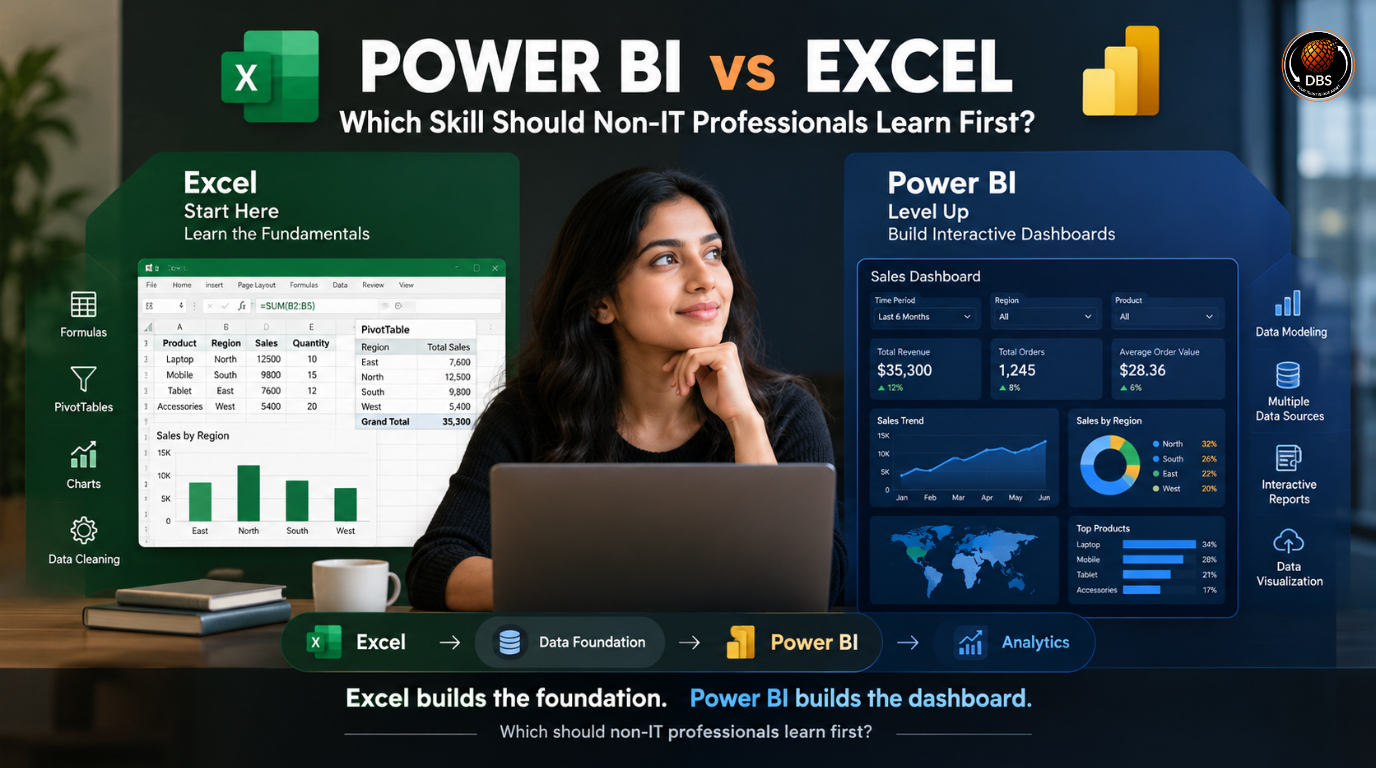
Excel is widely used for calculations, spreadsheets, reporting, budgeting, data cleaning and everyday business work.
Power BI focuses more on data analysis, interactive dashboards, data modeling and business intelligence.
So, should you learn Excel first?
For most beginners, yes.
However, the right choice depends on your current skills, career goal and the type of work you want to do.
This guide compares Excel and Power BI in simple terms and explains which one makes more sense for a non-IT professional.
What Is Excel?
Microsoft Excel is a spreadsheet application used to organize, calculate, analyze and present data.
It is common across finance, HR, sales, operations, administration, marketing and many other business functions.
A beginner can use Excel to create tables, calculate totals, filter information and prepare reports.
As skills improve, Excel can handle more advanced work through formulas, PivotTables, charts, Power Query and other features.
For example, a sales professional might have a spreadsheet containing:
- Customer names
- Product categories
- Monthly sales
- Sales representatives
- Revenue
- Region
Excel can help calculate total revenue, identify top-performing products and create monthly reports.
This makes Excel a strong starting point for people who are new to data.
You do not need a programming background to start learning it.
Why Excel Matters for Non-IT Professionals
Excel remains valuable because many business teams use spreadsheets for daily tasks.
A professional who can organize data, use formulas, create PivotTables and build clear reports can work more efficiently.
Important beginner Excel skills include:
- Sorting and filtering
- Basic formulas
- IF functions
- SUMIF and COUNTIF
- XLOOKUP
- PivotTables
- Charts
- Conditional formatting
- Data cleaning
- Power Query
These skills can support roles in finance, HR, sales, operations and business analysis.
Excel is also useful before learning Power BI because it teaches fundamental data concepts such as rows, columns, tables, calculations and data relationships.
What Is Power BI?
Microsoft Power BI is a business intelligence and data visualization platform.
It allows users to connect data from different sources, transform it, create data models and build interactive reports and dashboards.
Instead of sending a static spreadsheet to someone, you can create a dashboard where users can interact with the data.
For example, a sales dashboard could show:
- Total revenue
- Monthly sales
- Regional performance
- Top products
- Sales targets
- Year-over-year growth
Users can select a region or month and see the dashboard update accordingly.
Power BI becomes especially useful when datasets are larger, information comes from multiple sources or stakeholders need interactive reporting.
Why Power BI Is Valuable for Non-IT Professionals
Power BI is not limited to programmers.
Business users can learn Power BI without becoming software developers.
However, it does require an understanding of data concepts.
Useful Power BI skills include:
- Connecting data sources
- Data cleaning
- Power Query
- Data modeling
- Relationships
- DAX
- Data visualization
- Dashboard design
- Report publishing
For someone interested in business analysis, reporting, data analysis or business intelligence, Power BI can be a valuable skill.
Power BI vs Excel: Key Differences
| Feature | Excel | Power BI |
| Main purpose | Spreadsheet and analysis | Business intelligence and visualization |
| Beginner-friendly | Very high | Moderate |
| Calculations | Excellent | Excellent |
| Large datasets | Suitable within its limits | Better suited |
| Interactive dashboards | Basic to advanced | Strong |
| Data modeling | Available | Core capability |
| Data visualization | Good | Strong |
| Automation | Available | Strong |
| Programming required | No | No traditional programming required |
| Best for | Everyday business analysis | Dashboards and BI |
| Career use | Very broad | Strong for analytics and BI |
The biggest difference is not that one tool is better than the other.
It is how they are used.
Excel is often the flexible everyday business tool.
Power BI is more focused on turning data into interactive business insights.
Should You Learn Excel Before Power BI?
For most non-IT beginners, learning Excel first is the better approach.
You do not need to master every Excel feature before starting Power BI.
Instead, build a solid foundation in:
- Basic spreadsheet operations
- Formulas
- Tables
- Sorting and filtering
- PivotTables
- Charts
- Basic data cleaning
Once these concepts are comfortable, Power BI becomes easier to understand.
For example, if you already understand how a PivotTable summarizes sales data, the idea of building a Power BI visual becomes less intimidating.
The goal is not to spend years learning Excel before moving forward.
A focused Excel foundation can be followed by Power BI.
When You Should Start Power BI Directly
You may start Power BI earlier if you already understand basic spreadsheets and want to focus on data analytics.
For example, someone who regularly works with Excel reports may not need a long beginner Excel course.
Instead, they can move into:
Excel fundamentals → Power Query → Power BI → DAX → Dashboard projects
This creates a practical progression without spending unnecessary time on topics you already understand.
Excel vs Power BI for Career Growth
Both skills can support career growth, but their value depends on the role.
Excel is useful across almost every business department.
Power BI becomes particularly relevant for positions involving reporting, analytics and business intelligence.
Potential roles include:
- Business Analyst
- Data Analyst
- Reporting Analyst
- MIS Analyst
- Operations Analyst
- Sales Analyst
- Financial Analyst
- HR Analyst
- Business Intelligence Analyst
For non-IT professionals trying to move toward technology-related roles, Power BI can provide a useful bridge between business knowledge and technical data skills.
Your existing industry knowledge can also become an advantage.
For example, a sales professional who learns Power BI can combine sales knowledge with data reporting skills.
A finance professional can use Power BI to build financial dashboards.
An HR professional can analyze recruitment and employee data.
Does Power BI Require Coding?
Power BI does not require traditional programming knowledge to get started.
However, advanced Power BI work involves DAX, data modeling and more complex data transformation.
DAX stands for Data Analysis Expressions.
It is a formula language used in Power BI for creating calculations and measures.
A beginner does not need to learn advanced DAX on day one.
Start with basic data preparation and visual reporting.
Then gradually add DAX and data modeling skills.
Which Is Easier: Excel or Power BI?
Excel is generally easier for beginners.
Most people understand the spreadsheet concept quickly because information is displayed in rows and columns.
Power BI introduces additional concepts such as:
- Data models
- Relationships
- Measures
- Power Query
- DAX
- Report pages
- Data refresh
That does not mean Power BI is extremely difficult.
It means there is a larger learning curve.
If you already understand Excel, data tables and basic analysis, the transition is much smoother.
Power BI vs Excel: Which One Should You Learn First?
The simplest answer is:
Start with Excel if you are completely new to data.
Start Power BI sooner if you already have basic Excel knowledge and want to move toward analytics.
A practical learning sequence is:
Step 1: Excel fundamentals
Learn formulas, tables, sorting, filtering and charts.
Step 2: Excel analysis
Learn PivotTables, XLOOKUP, conditional logic and basic data cleaning.
Step 3: Power Query
Learn how to import, clean and transform data.
Step 4: Power BI
Learn data connections, visuals, reports and dashboards.
Step 5: Data modeling
Understand relationships, calculated columns and measures.
Step 6: DAX
Learn commonly used DAX functions and build practical calculations.
Step 7: Projects
Create dashboards using realistic business datasets.
This approach gives beginners a clear path without trying to learn everything simultaneously.
A Simple Decision Guide
Choose Excel first if:
- You are completely new to data.
- Your current job uses spreadsheets.
- You want a broadly useful business skill.
- You need to improve reporting and calculations.
- You have never worked with structured data.
Choose Power BI if:
- You already know basic Excel.
- You want to learn data visualization.
- You are interested in business analytics.
- You want to create interactive dashboards.
- You are targeting analyst or BI-related roles.
Learn both if:
- You want a stronger analytics foundation.
- You work with business data regularly.
- You want to transition toward data-focused roles.
- You want to combine business knowledge with technology skills.
Final Verdict: Excel or Power BI?
There is no universal winner.
For most non-IT professionals, Excel should come first because it builds essential data-handling skills and is widely used across business functions.
Power BI should follow when you are ready to work with interactive dashboards, larger datasets, multiple data sources and business intelligence.
Think of the two skills as connected rather than competing.
Excel can give you the foundation.
Power BI can help you build on it.
If your goal is to move from a non-IT background toward an IT, analytics or business intelligence career, learning both can create a practical skill combination.
The key is not collecting certificates.
Build real projects.
Analyze realistic datasets.
Create dashboards.
Learn how businesses use data to make decisions.
That is where the skill becomes valuable.
Frequently Asked Questions
Is Power BI better than Excel?
Power BI is not simply better than Excel. Power BI is stronger for interactive dashboards, business intelligence and data visualization, while Excel is highly flexible for calculations, spreadsheets and everyday business analysis.
Should I learn Excel before Power BI?
Yes, if you are completely new to data. Basic Excel knowledge makes concepts such as tables, calculations, filtering and data analysis easier to understand when you begin Power BI.
Can a non-IT professional learn Power BI?
Yes. Power BI can be learned without a computer science background. Beginners should start with data preparation, basic visualization and simple reports before moving into DAX and advanced data modeling.
Is Power BI difficult for beginners?
Power BI has a steeper learning curve than basic Excel because it introduces data modeling, Power Query, DAX and interactive reporting. A structured learning path makes it much easier.
Which is better for jobs, Excel or Power BI?
Excel is useful across a very broad range of jobs. Power BI can be particularly valuable for analyst, reporting and business intelligence roles. Learning both provides a stronger combination than relying on either tool alone.
Can Excel and Power BI be used together?
Yes. Excel can be used for data preparation and analysis, while Power BI can turn data into interactive reports and dashboards. Microsoft also provides tools that connect the two workflows.
Digital Business Solutions IT — Empowering Non-IT Professionals to Build Their Future in IT.
Take the first step toward your IT career today.
Digital Business Solutions IT — Helping Non-IT Professionals Build Their Future in IT.
Book your free career consultation: https://forms.gle/spZqzEs2WGxepktg6
Watch real stories and career tips on our podcast: https://youtu.be/xlrOIaZTwWI
Follow Digital Business Solutions IT for weekly career tips:
- Instagram: @official_biplob_mandal
- LinkedIn: Biplob Mandal
Call us: +91 9307867881 / +91 7558759407
Email: contactus@digitalbusinesssolutionsforyou.com
Visit us: Office No. 412, 4th Floor, City Space, Digital Business Solutions IT, Pune Nagar Rd, above Aakash Eye Clinic, Viman Nagar, Pune, Maharashtra 411014